OUI_XFAB documentation
OUI, EAPWebManager, and EAP System Architecture and UI Decision
Status: Proposed target architecture; current-state inventory verified against the three repositories on 20 August 2026.
Decision: Keep OUI as the production operator UI. Keep EAPWebManager as a standalone runtime service. If engineering diagnostics require a browser UI, build a separately deployed, restricted, initially read-only EAP Web Manager Console and link it explicitly from OUI. Do not embed it in an iframe and do not expose the existing PlantU listener directly to users.
1. Purpose and scope
This document explains the system as one end-to-end product while preserving its real ownership boundaries. It covers:
- OUI presentation, state, access, and WebSocket infrastructure.
- EAPWebManager command routing, subscription ownership, persistence, liveness, and PLUS integration.
- EAP equipment authority, snapshot publication, command execution, and factory integration.
- Operator, synchronization, prompt, alarm/history, identity, and administration workflows.
- Deployment and trust boundaries.
- The decision between integrating Web Manager functions into OUI, building a fully standalone UI, or using a linked hybrid.
The proposed Web Manager Console is not implemented today. The target-state sections define the conditions under which it should be built.
2. Executive decision
Use a linked-hybrid architecture:
- OUI remains the only production operator-facing application.
- Daily equipment work and curated safe configuration remain in OUI.
- EAPWebManager remains an independent backend/runtime deployment.
- A future Web Manager Console is a sibling frontend for authorized engineers, not another operator shell.
- Phase 1 of that console is read-only and exposes only bounded, typed diagnostic contracts.
- The console is reached through an authenticated HTTPS management route such as
/webmanager-console/. - OUI and the console use explicit navigation and return links; neither embeds the other.
- Future mutations require authorization, validation, audit, concurrency control, and recovery semantics before release.
This decision preserves a coherent operator workflow without coupling runtime engineering controls to the production UI release and failure boundary.
3. Current system landscape
Open the interactive system landscape.
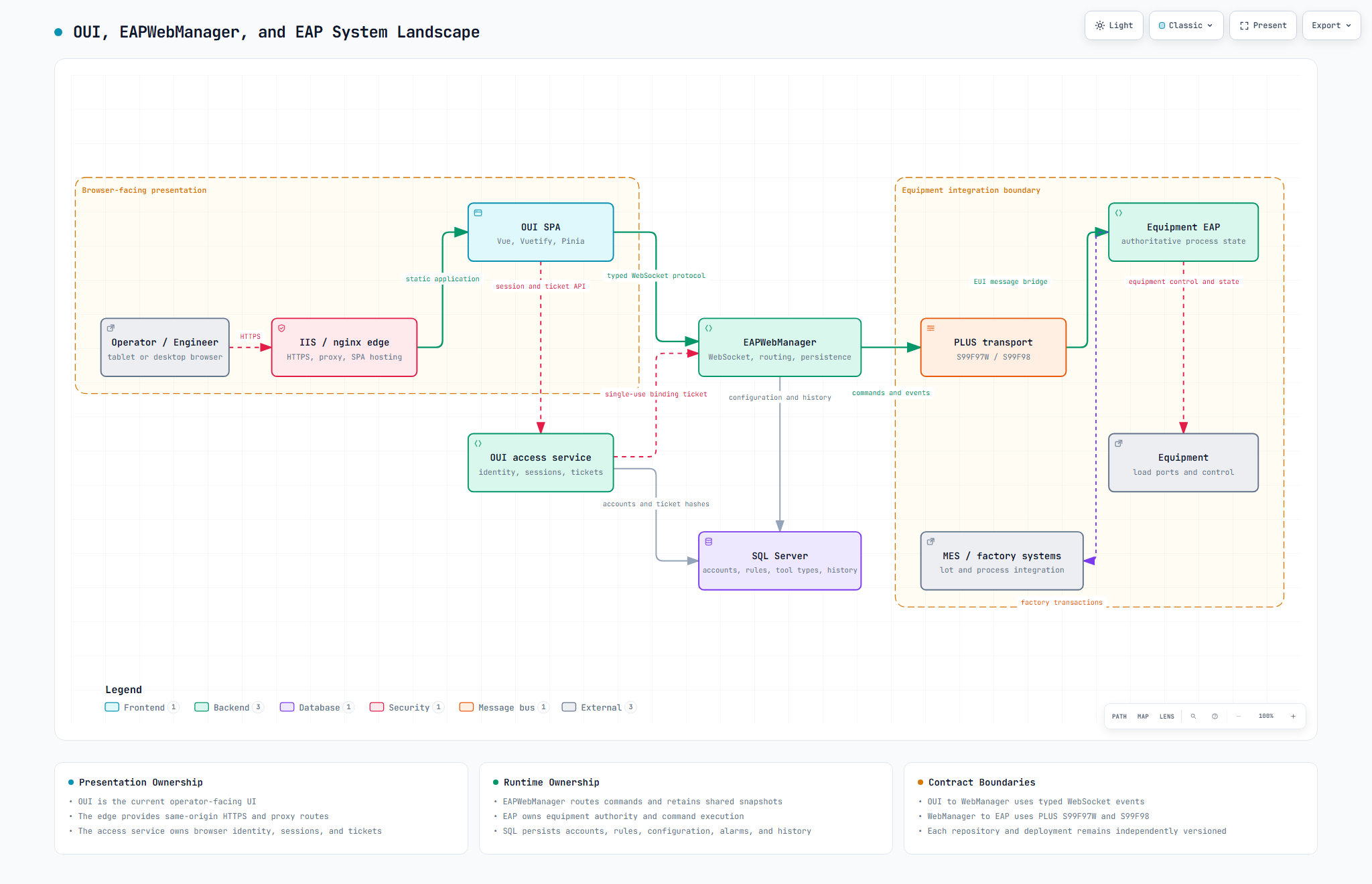
The application crosses three principal boundaries:
- Presentation: operator browser, HTTPS edge, and OUI SPA.
- Trusted server services: OUI access service, EAPWebManager, and SQL Server.
- Equipment integration: PLUS transport, the equipment-specific EAP, equipment, and MES/factory systems.
The current source repositories and deployments remain separate:
| Unit | Primary responsibility | Technology/runtime | Independent release |
|---|---|---|---|
| OUI | Operator presentation, application state, typed client gateways, browser access flows | Vue 3, Vuetify 4, Pinia, TypeScript | Yes |
| OUI access service | Browser identity, administrator session, account/audit operations, single-use WebSocket tickets | Node.js service and SQL adapter | Packaged with OUI release, operated separately |
| EAPWebManager | WebSocket command/event boundary, subscriptions, shared snapshots, persistence, PLUS routing | PlantU STP/STS | Yes |
| Equipment EAP | Equipment authority, process state, commands, snapshots, MES/equipment integration | PlantU STP/STS | Yes, usually per equipment family/instance |
| SQL Server | Accounts, ticket hashes, workstation rules, tool types, history, alarms, retention data | SQL Server | Operational dependency |
4. Ownership model
OUI owns
- Application shell, navigation, routes, localization, preferences, and responsive tablet/desktop presentation.
- Equipment, load-port, dispatch, alarm, history, version, dynamic-popup, configuration, administration, and workstation-identity modules.
- Pinia state and lifecycle generations that prevent stale updates.
- Browser WebSocket transport, request/reply ownership, event distribution, reconnect, heartbeat, and synchronization presentation.
- User-facing validation, focus behavior, pending states, toast/dialog presentation, and read-only degradation.
- HTTP interaction with the OUI access service for session, account, audit, and ticket work.
OUI does not own the authoritative equipment state or execute equipment commands directly.
EAPWebManager owns
- WebSocket listener and dynamic
UI_<Command>dispatch. - Subscription ownership and equipment-to-browser event routing.
- Shared equipment snapshots and transaction state used for subscriber recovery.
- PLUS transport to EAP and mapping between WebSocket commands/events and EUI messages.
- SQL queries and persistence for tool types, workstation rules, history, alarms, and retention.
- WebManager/EAP/engine liveness checks, retention schedules, popup expiry, and version reporting.
- Workstation and administrator WebSocket binding based on tickets issued by the access boundary.
EAPWebManager does not own the production operator experience. Its current PlantU scope intentionally does not implement a complete in-project browser authentication/RBAC product.
EAP owns
- Authoritative equipment, load-port, control-mode, alarm, process, and command state.
- Equipment communication and process execution.
- Building and publishing basic-info, load-port, connectivity, transaction, and active-alarm snapshots.
- Processing reset, control-mode, load-port, run-info, and dynamic-popup responses.
- Emitting history, alarm, prompt, popup, and incremental state events.
- PLUS EUI protocol handling: requests/events use
S99F97W; valid acknowledgements useS99F98.
The browser must never infer a final equipment state from an acknowledgement alone. It reconciles against the later authoritative EAP state.
5. OUI function catalog
| Area | Current functions | Owner |
|---|---|---|
| Equipment catalog | Load tool list, select equipment, retain stale selection safely | Equipment module |
| Equipment monitoring | Basic information, connectivity, transaction log, load-port state, active alarms | Equipment module |
| Equipment actions | Reset EAP, set control mode, load/unload actions with pending-state reconciliation | Equipment module |
| Lot dispatch | Equipment-scoped lot rows and generation-safe refresh | Lot-dispatch module |
| History | Query bounded equipment history records | History module |
| Alarms | Active alarms and alarm-history queries | Equipment and alarm-history modules |
| Prompts | Run-information confirmation and equipment-scoped dynamic popups | Equipment and dynamic-popup modules |
| Configuration | Tool-type configuration list, edit, validation, and result handling | Configuration module |
| Administration | Login/session, accounts, audit, WebSocket admin binding, workstation rules | Administration module and access service |
| Identity | IIS/DNS workstation lookup and per-WebSocket-generation binding | Workstation-identity module |
| Version | OUI/static version and EAPWebManager version display | Version module |
| Shared runtime | Transport, codec, broker, event bus, reconnect, errors, toast, Vuetify, i18n | Infrastructure and shared owners |
OUI routes currently include equipment, lot dispatch, events/alarms, version, configuration overview/tools/workstations/accounts, and configuration login.
6. EAPWebManager function catalog
The verified WebSocket command handlers are:
UI_GetWebManagerVersionUI_BindWorkstationUI_AdminAuthenticateUI_GetWorkstationAccessRulesUI_UpsertWorkstationAccessRuleUI_DeleteWorkstationAccessRuleUI_LoadPortActionUI_GetToolListUI_GetToolTypeConfigurationListUI_GetHistoryRecordsUI_GetActiveAlarmsUI_GetAlarmHistoryRecordsUI_ConfirmRunInfoUI_RespondDynamicPopupUI_SubscribeUI_HeartbeatUI_ResetEAPUI_SetControlModeUI_UnsubscribeUI_ToolTypeConfiguration
The verified EAP/event handlers include dynamic popups, alarm/history records, basic/load-port/connectivity/transaction snapshots and updates, heartbeat, and run-information display. Scheduled functions cover popup expiry, history retention, tool-type refresh, EAP liveness, and engine liveness.
Its configuration families cover runtime/TCP settings, logging, PLUS, database connection, alive intervals, tool-list refresh, transaction caps, workstation policy, initial administrator bootstrap, history retention, global maps, and SQL templates. Secret values must remain redacted from documentation and diagnostics.
7. EAP function catalog
Common/EAP_WebUI.sts provides the EUI/PLUS bridge used by equipment EAP projects. Its responsibilities include:
- Full snapshots: basic info, load-port state, connectivity, transaction log, and active alarms.
- Incremental updates: basic info, load-port button state, and transaction log.
- Operator command handling: heartbeat, reset, control-mode changes, load-port actions, run-info confirmation, and popup response.
- Events: run information, history records, dynamic popup, and alarm records.
- Protocol acknowledgements and state publication through the S99F97W/S99F98 exchange.
Different equipment projects can include the common bridge while retaining equipment-specific process and factory logic.
8. Data and configuration ownership
| Data/configuration | Authoritative owner | Persistence/transport | Presentation owner |
|---|---|---|---|
| Equipment process and load-port state | EAP | Equipment interfaces and PLUS snapshots | OUI |
| Current subscription snapshots | EAPWebManager cache, sourced from EAP | PlantU maps/state | OUI |
| Transaction log display window | EAP/EAPWebManager, bounded at each layer | PLUS and WebSocket | OUI |
| Tool-type configuration | EAPWebManager/SQL | SQL plus WebSocket commands | OUI configuration module |
| History and alarm records | EAP events persisted by EAPWebManager | SQL | OUI history/alarm modules |
| Workstation rules | EAPWebManager/SQL | WebSocket admin commands | OUI administration module |
| Accounts, sessions, CSRF, audit, ticket hashes | OUI access service/SQL | HTTPS and SQL | OUI administration module |
| Browser preferences | OUI | Browser storage, failure-tolerant | OUI |
| PlantU runtime configuration | EAPWebManager/EAP deployment | App.ini, Code.ini, operational configuration |
No direct editor in current OUI |
9. Protocol and request model
OUI sends typed JSON envelopes over one managed WebSocket connection. Command and event names come from the central WS_EVENTS registry. Incoming data remains unknown until the owning gateway/decoder validates it.
RequestBroker registers reply ownership before sending. Requests sharing a reply event are serialized because replies do not include a correlation identifier. A timed-out reply event is quarantined for the current connection so a late reply cannot satisfy later work. Disconnect rejects pending work and resets quarantine with the transport generation.
EAPWebManager translates approved WebSocket commands into PLUS EUI messages. EAP handles the operation and replies with S99F98 where required. Separately, EAP emits authoritative snapshots or incremental state, which EAPWebManager routes to the correct subscriber.
10. Operator command workflow
Open the interactive operator-command sequence.
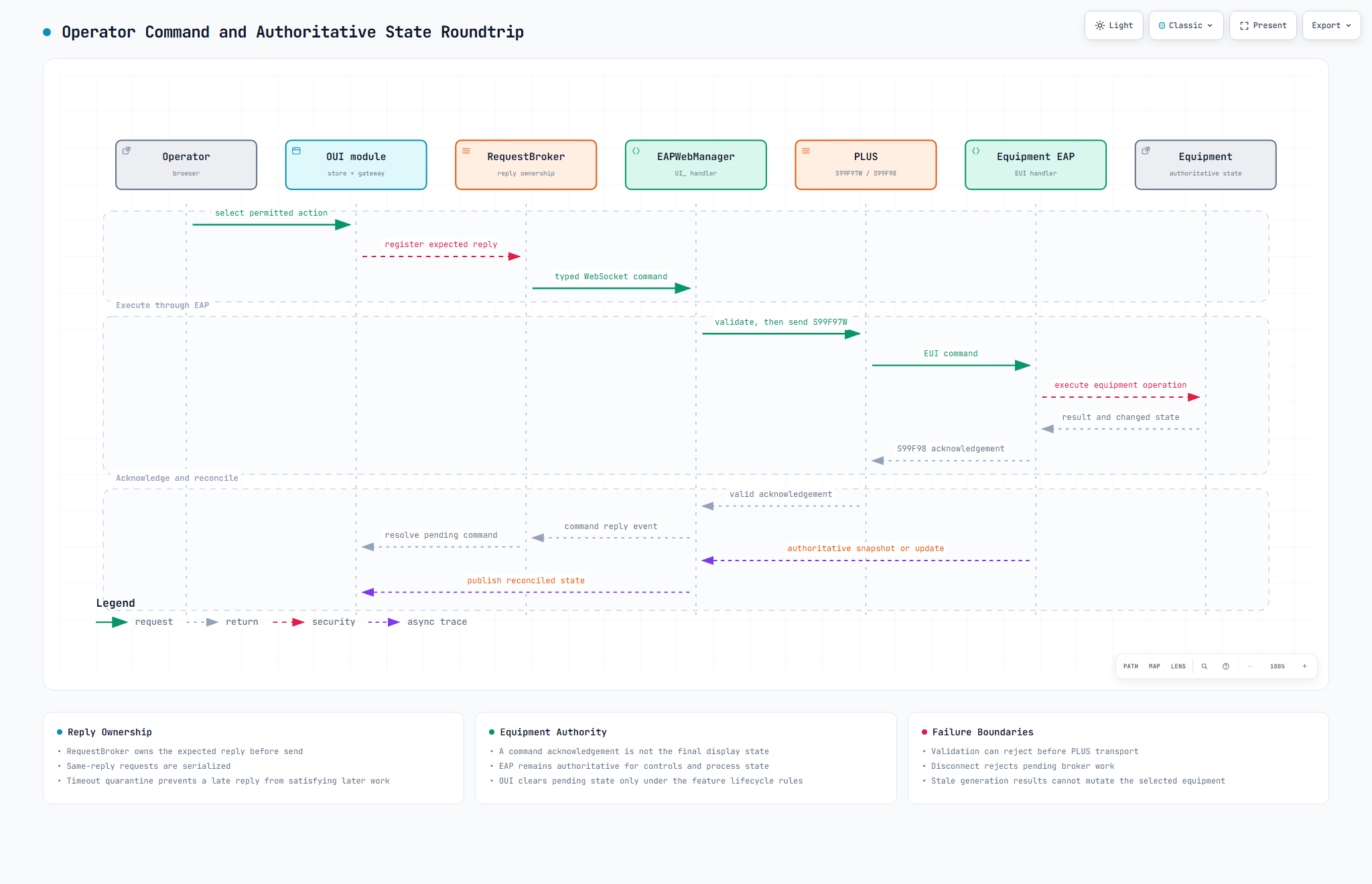
- OUI renders an action only when EAP state and OUI lifecycle gates permit it.
- The module validates the action and marks the command pending.
RequestBrokerowns the expected reply before transport send.- EAPWebManager validates command context and routes an S99F97W request through PLUS.
- EAP executes against equipment and emits S99F98 acknowledgement where appropriate.
- The acknowledgement resolves the command request, but does not replace authoritative state.
- A later EAP snapshot/update changes the displayed control state.
- Generation guards prevent replies from a former equipment selection or connection from mutating current state.
11. Connection and synchronization workflow
Open the interactive synchronization lifecycle.
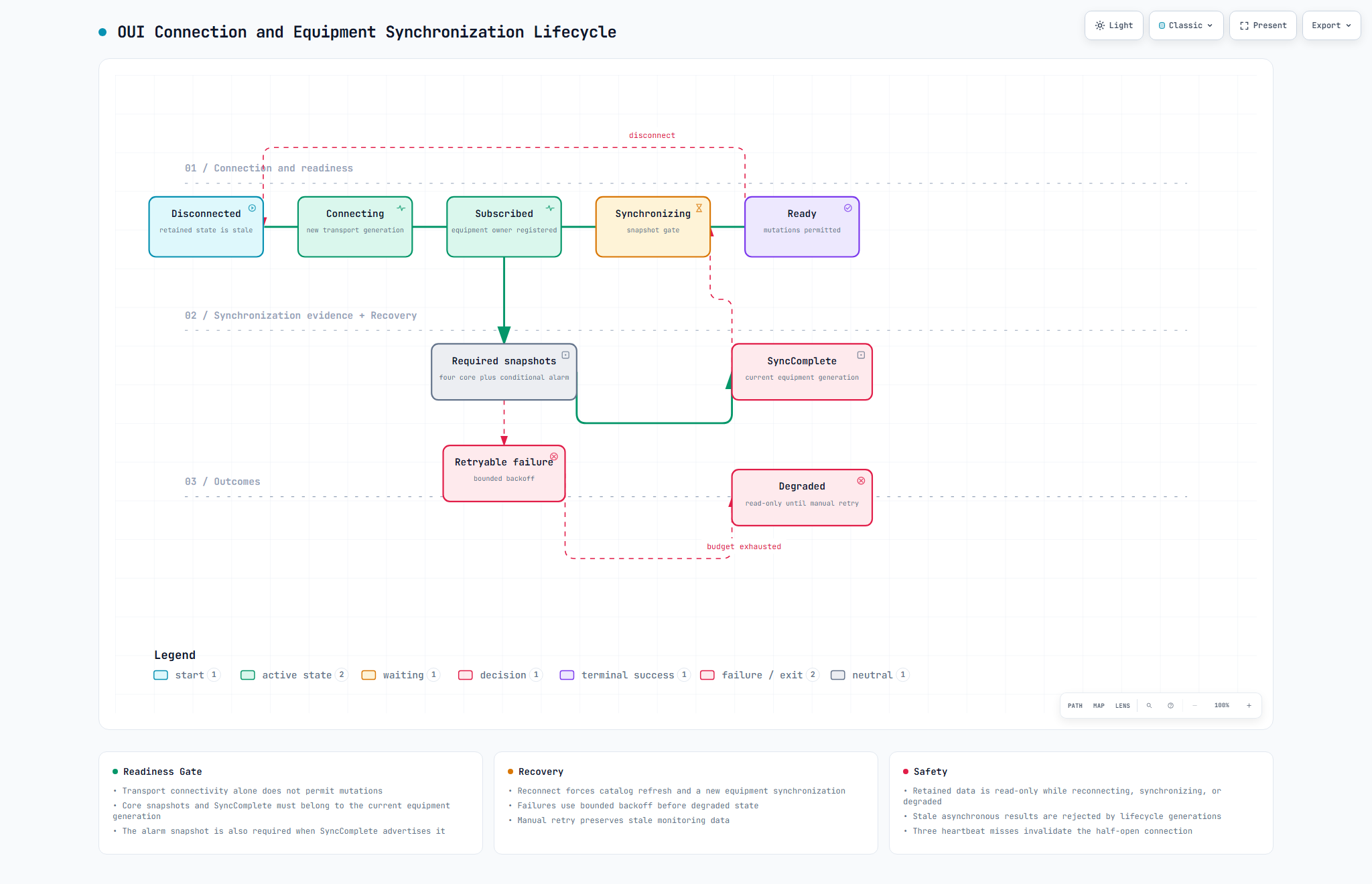
Connectivity and readiness are separate. After a false-to-true connection transition, OUI refreshes the catalog, subscribes to the selected equipment, and begins recovery. Basic info, load-port info, connectivity, and transaction log are core snapshots. When SyncComplete.activeAlarmAvailable advertises active-alarm support, the alarm snapshot is also required.
Only a successful equipment-scoped SyncComplete plus the required current-generation snapshots produces ready. Retryable failures use bounded backoff and ultimately enter degraded. Monitoring data is retained as stale and read-only while disconnected, synchronizing, or degraded. Manual retry preserves that data.
12. Prompt and dynamic-popup workflow
EAP emits run-information or dynamic-popup content through EAPWebManager. The owning OUI module validates bounded localized content before rendering it. Prompt state is explicitly consumed so dismissal does not reopen an old request.
One dynamic popup may be active per UI owner. A load-port popup uses durable load-origin ownership. A generic popup is delivered only when exactly one OUI engine owns the equipment; ambiguous ownership is rejected. Confirm/Cancel remains pending until the equipment-scoped acknowledgement. Local expiry closes without inventing a backend action and releases ownership.
13. Alarm and history workflow
EAP emits alarm and history events. EAPWebManager persists them and provides bounded query handlers. OUI requests equipment-scoped active alarms, history, or alarm-history rows through typed gateways. Decoders validate payloads before domain state is updated.
Retention runs in EAPWebManager, not the browser. A future console may show retention health and last-run evidence, but it should not expose arbitrary deletion or SQL execution.
14. Identity, administration, and ticket binding
The OUI access service and EAPWebManager have different responsibilities:
- The access service owns browser administrator sessions, CSRF, account operations, audit work, workstation identity lookup, and single-use ticket issuance.
- EAPWebManager consumes tickets to bind workstation or administrator authority to a WebSocket generation and owns workstation-rule WebSocket commands.
Workstation identity is informational and does not gate equipment mutations. Administrator session/CSRF and administrator WebSocket binding still gate protected administration. On reconnect, OUI obtains a fresh single-use ticket. Stale binding responses cannot restore authority to a new generation.
15. Deployment and trust boundaries
Production browser traffic terminates at IIS or nginx. The edge serves the OUI SPA and proxies browser-safe same-origin routes. EAPWebManager listens behind the proxy for equipment WebSocket traffic. The OUI access service stays loopback-only and has a narrowly routed workstation identity endpoint.
The Web Manager Console target adds a separate HTTPS path and static deployment. It must not make the raw PlantU WebSocket listener a public management endpoint. Required controls are:
- Restricted network placement or management access policy.
- Authenticated engineer session and scoped, short-lived/single-use WebSocket ticket.
- Server-enforced authorization for every diagnostic capability.
- Redaction at the server boundary, not merely in the browser.
- Independent logging and audit evidence.
- Rate, response-size, and retention bounds.
16. UI placement options
Option A: Integrate all Web Manager functions into OUI
Advantages: one navigation system, one design language, reuse of existing access/session infrastructure, and minimal context switching.
Disadvantages: engineering/runtime functions increase the operator UI blast radius; OUI releases become coupled to WebManager internals; roles and navigation become harder to reason about; diagnostic failures can affect production workflows; unsafe functionality is easier to expose accidentally.
Option B: Fully standalone Web Manager UI
Advantages: clean deployment and failure isolation; engineering workflow can evolve independently; runtime diagnostics stay out of the operator shell.
Disadvantages: duplicates login/navigation/design/access integration; fragments safe curated configuration already implemented in OUI; increases training and support burden; can produce conflicting representations of equipment state.
Option C: Linked hybrid
Advantages: operators retain a single OUI workflow; engineering diagnostics are isolated; shared access/ticket contracts can be reused; each application releases independently; deep links preserve context without iframe coupling.
Disadvantages: requires deliberate cross-application navigation, shared identity design, contract/version management, and an additional deployable frontend.
17. Weighted decision matrix
Scores use 1 (poor) to 5 (strong). Weighted total is out of 500.
| Criterion | Weight | All in OUI | Standalone only | Linked hybrid |
|---|---|---|---|---|
| Operator workflow continuity | 20 | 5 | 2 | 5 |
| Engineering/runtime isolation | 20 | 2 | 5 | 5 |
| Security boundary clarity | 20 | 2 | 4 | 5 |
| Independent release/failure boundary | 15 | 2 | 5 | 5 |
| Reuse of current UI/access investment | 10 | 5 | 2 | 4 |
| Long-term maintainability | 10 | 2 | 4 | 5 |
| Delivery complexity | 5 | 4 | 3 | 3 |
| Weighted total | 100 | 300 | 375 | 480 |
The linked hybrid wins because it separates user personas and operational risk while retaining OUI for tasks that are already coherent and governed there.
18. Recommended target architecture
Open the interactive linked-hybrid target diagram.
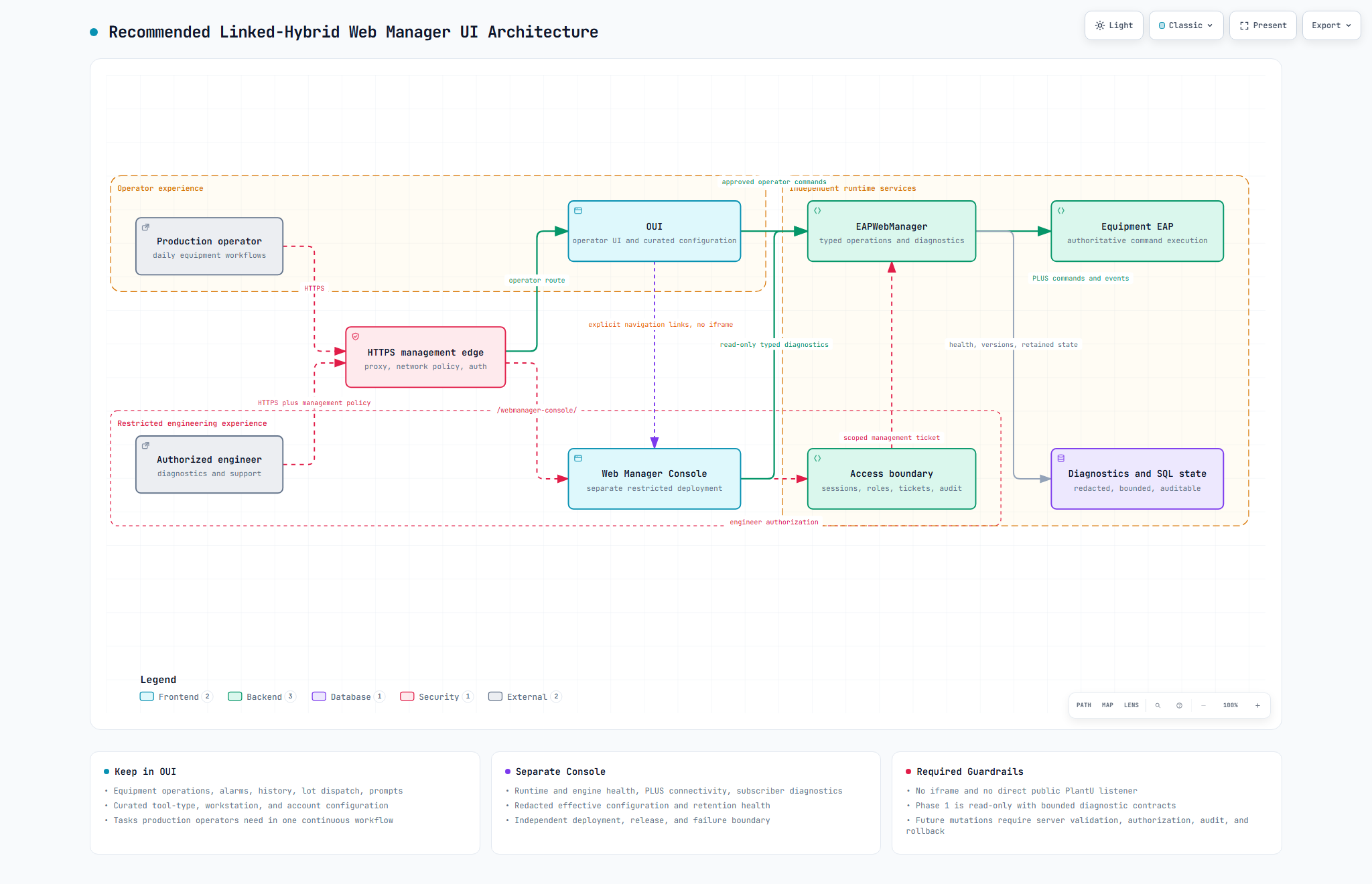
The console is a sibling client of EAPWebManager. It does not own equipment authority and does not bypass EAP. OUI and the console can share navigation conventions and an access boundary without sharing the same release artifact or runtime state.
19. Functions that stay in OUI
- Equipment selection, monitoring, synchronization status, and operator actions.
- Load-port visualization and permitted load/unload actions.
- Lot dispatch, run information, confirmations, and dynamic popups.
- Active alarms, alarm history, and equipment history.
- WebManager and OUI version display suitable for operators/support.
- Curated tool-type configuration.
- Existing workstation-rule and account-management workflows governed by administrator access.
- Clear connection, degraded, stale, pending, and failure presentation.
These functions participate directly in the production operating workflow or already have a bounded configuration contract.
20. Functions for the standalone console
Phase 1 should be read-only:
- WebManager start time, version, runtime health, and engine health.
- EAP liveness, PLUS connectivity, heartbeat age, and last successful exchange.
- Connected subscriber counts and equipment subscription ownership, with sensitive client details minimized.
- Snapshot availability/age and synchronization diagnostics.
- Database connectivity and bounded query/retention health.
- History-retention configuration inventory and last-run result.
- Effective runtime configuration inventory with secret values redacted at source.
- Bounded recent routing/command/event diagnostics with correlation context where available.
- Deployed contract/capability versions for OUI, WebManager, and EAP.
Do not include in phase 1:
- Raw
App.iniorCode.iniediting. - Arbitrary command/event construction.
- Unrestricted SQL or file browsing.
- Service restart, process termination, or engine start/stop.
- Secret display or download.
- A generic administrative bypass around OUI/access-service authorization.
21. Integration and deep-link contract
Use explicit browser navigation, not an iframe. A link from OUI can carry only non-sensitive context, for example equipment ID and a target console view. The console must revalidate the requested equipment and the engineer's authorization server-side.
Recommended rules:
- Base path:
/webmanager-console/behind the same managed HTTPS edge. - Independent static assets, version file, CI, artifact, and rollback.
- A return URL restricted to an allowlisted same-origin OUI path.
- Context values are hints, never authorization.
- The console requests a scoped management ticket only after an authenticated engineer session.
- WebSocket capability/version negotiation fails closed when the console requires an unsupported contract.
22. Security prerequisites
Before console implementation begins, approve:
- Engineer roles and least-privilege capabilities.
- Network reachability and whether management VPN/jump-host policy is required.
- Session, CSRF, WebSocket ticket, timeout, and revocation rules.
- Audit schema for login, diagnostic reads, exports, and future mutations.
- Server-side secret classification and redaction tests.
- Response and log bounds to prevent operational data leakage or browser overload.
- Fail-closed behavior when authorization, audit storage, or contract negotiation is unavailable.
The accepted lack of in-project PlantU RBAC is not an authorization model for a new browser console. The external access/proxy boundary must supply that control, and EAPWebManager must still validate scoped capabilities on each management command.
23. Phased implementation roadmap
Phase 0: Decision and contracts
- Confirm personas, role matrix, reachability, ownership, and deployment model.
- Inventory required diagnostics and define typed read-only contracts.
- Version the management capability contract independently from operator events.
- Define audit/redaction and acceptance criteria.
Phase 1: Restricted read-only console
- Build independent Vue/Vuetify frontend or another approved frontend using the same visual tokens where practical.
- Add management edge route and access-service engineer session/ticket support.
- Add bounded health, liveness, subscription, retention, version, and redacted configuration endpoints/events.
- Add explicit OUI link and safe return/deep links.
- Validate deployment isolation and failure containment.
Phase 2: Operational evidence and support tools
- Add time-bounded diagnostics export with audit.
- Add capability/version compatibility view.
- Add guided health checks that remain read-only.
Phase 3: Selected mutations only if justified
- Approve each mutation separately.
- Implement typed command, authorization, validation, idempotency, concurrency protection, audit, acknowledgement, authoritative-state reconciliation, and rollback/runbook.
- Never add a raw command, file, or SQL console as a shortcut.
24. Test and acceptance matrix
| Area | Required acceptance evidence |
|---|---|
| OUI regression | Existing unit, type, lint, build, and production-preview browser suites remain green |
| Contract compatibility | Producer/consumer fixtures for every new management request, reply, error, and version capability |
| Authorization | Role/capability allow and deny tests at server boundary; UI hiding is not sufficient |
| Tickets/session | Single-use, expiry, replay rejection, disconnect/reconnect, revocation, and stale-generation tests |
| Redaction | Known secret keys and connection strings never leave server in diagnostics or exports |
| Bounds | Maximum rows, payload bytes, event rates, query ranges, and export sizes enforced server-side |
| Audit | Success, denial, failure, export, and future mutation events produce durable evidence |
| Failure isolation | Console unavailable does not affect OUI or EAPWebManager operator traffic |
| Deployment | Independent build, immutable artifact, rollback, proxy route, health check, and access-policy verification |
| Browser UX | Supported 768px+ layouts, keyboard/focus behavior, localization, empty/loading/error/stale states |
25. Operational failure boundaries
- OUI unavailable: operator presentation is unavailable; EAP and WebManager runtime operation must continue.
- Console unavailable: engineering diagnostics are unavailable; OUI/operator and EAP runtime must continue unaffected.
- Access service unavailable: new privileged sessions/tickets fail closed; already established equipment monitoring follows existing lifecycle rules.
- EAPWebManager unavailable: WebSocket monitoring/commands fail; OUI retains stale data read-only and reconnects with backoff.
- EAP unavailable: WebManager reports liveness loss; no browser client may synthesize equipment authority.
- SQL unavailable: persistent account/configuration/history operations fail explicitly; equipment transport behavior is assessed independently.
- PLUS degraded: commands and snapshot recovery fail or age; console may expose evidence but must not bypass PLUS/EAP.
26. Risks and open decisions
Before implementation, resolve:
- Who qualifies as an authorized engineer, and which organization owns approvals?
- Is same-origin access sufficient, or must the console require VPN/jump-host/network segmentation?
- Should the existing OUI access service own engineer roles, or should a separately approved management identity service do so?
- Which exact diagnostics are required for first release, and what are their size/time bounds?
- What retention and privacy rules apply to subscriber and command diagnostics?
- Which repository owns the new console, its contract fixtures, and deployment pipeline?
- Is any mutation truly required after the read-only phase, and what is its rollback model?
27. Decision consequences
Positive consequences:
- Operator UX remains focused and stable.
- Engineering tools gain an independent deployment and failure boundary.
- Security review can focus on a small management surface.
- The current OUI investment remains useful without turning OUI into a general runtime console.
- EAP remains the single equipment authority.
Costs:
- A second frontend artifact and release pipeline must be maintained.
- Identity/ticket capability must support an engineer persona.
- Cross-application links and contract versions need explicit governance.
- Support teams must understand which application owns each function.
28. Glossary
| Term | Meaning |
|---|---|
| OUI | Operator-facing Vue web application |
| EAPWebManager | PlantU runtime connecting browser WebSocket traffic, SQL state, and EAP through PLUS |
| EAP | Equipment Automation Program; authoritative equipment/process integration runtime |
| EUI | Equipment UI message contract implemented by the shared EAP bridge |
| PLUS | Transport used between EAPWebManager and EAP |
| S99F97W | PLUS request/event message used by the EUI bridge |
| S99F98 | Valid acknowledgement message for EUI requests |
| RequestBroker | OUI infrastructure that owns request/reply serialization, timeout, and quarantine |
| SyncComplete | Equipment-scoped recovery completion event used with required snapshots to establish readiness |
| Linked hybrid | OUI and a separate console connected by explicit links and shared governed contracts |
29. Evidence and authority
The current-state inventory was derived from the OUI route/module/runtime sources, EAPWebManager EAPWebManager.stp and included STS sources, and the EAP Common/EAP_WebUI.sts bridge. Static PlantU inspection establishes source design and handler presence; it does not prove that a deployed PlantU runtime compiled, loaded, or exercised every path.
For authoritative OUI implementation rules, also read the architecture guide, runtime flows, security and deployment, and repository AGENTS.md/docs/architecture.md contracts.